
IAU SPORTS
ARENA
Two full basketball courts side by side with a stage up top and the entrance below.
Venue Layout
Field area, ball games courts, stage, bleachers and parking at a glance.
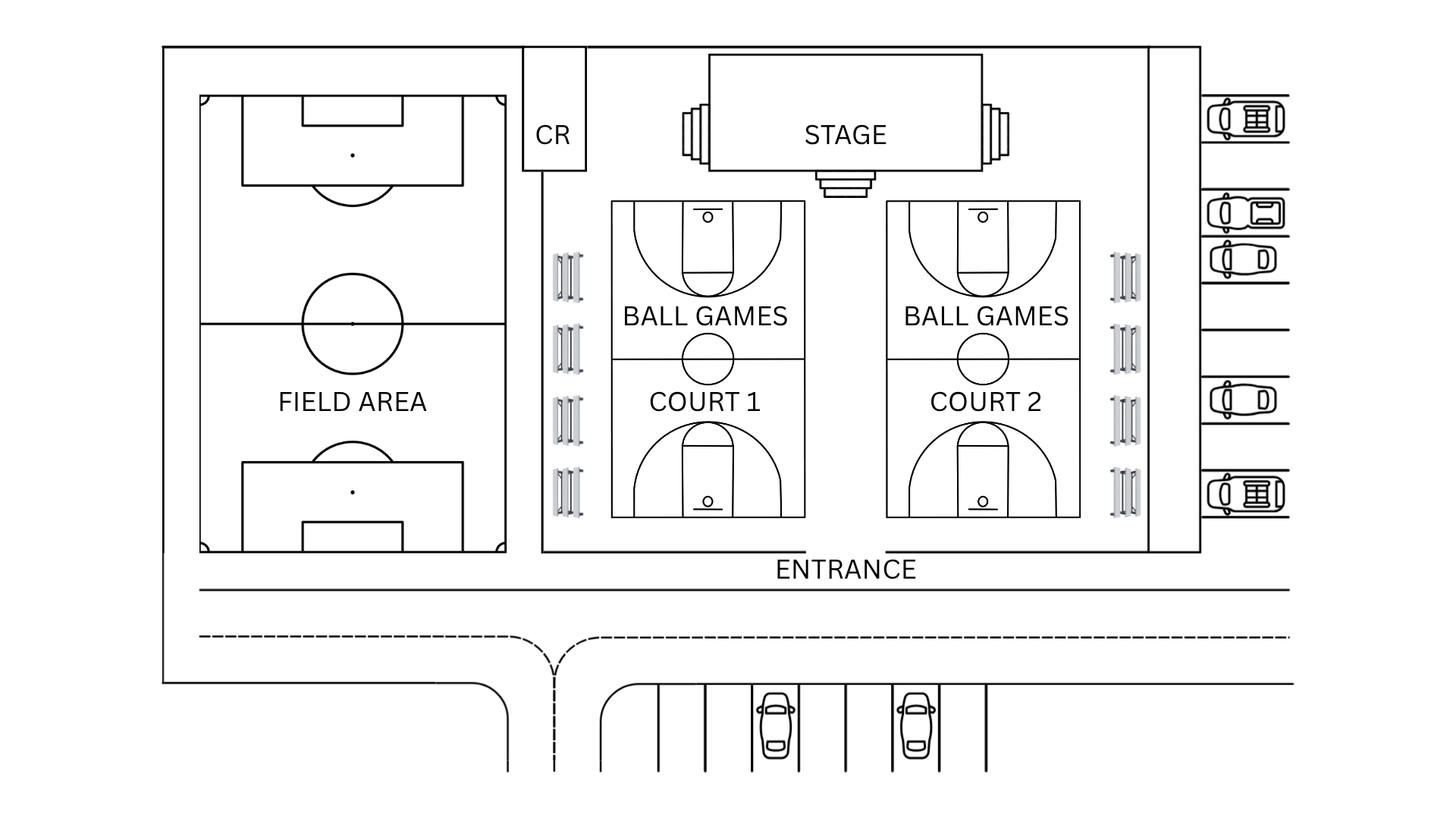
Swipe sideways to see the full layout →
Through The Years
A look back at how the arena has been used.
Check availability
Pick a date — every court and the whole arena show side by side below. Click an hour in a column to select it, click an adjacent hour to add more, click it again to remove it.
How To Book
Four quick steps from picking a schedule to a locked-in booking.
-
1
Log in or sign up
You need a free account to book. It only takes a minute.
-
2
Choose your schedule & area
Pick a date, then select your hours for a court, the Football Area or the Whole Arena. Add any extras you need, choose your specific activity (required), then submit your booking.
-
3
Wait for approval
Your booking starts as Pending. Once the arena team approves it, its status changes to Confirmed in My Bookings.
-
4
Pay the exact amount
Use the payment details in My Bookings and upload your proof of payment. Once verified, your booking is locked in.
About the venue
- Hours
- —
- Courts
- Ball Games Court 1, Ball Games Court 2
- Also on-site
- Football Area (independent space beside the arena)
- Also hosts
- Events, programs, tournaments (whole arena + stage)
Booking policy
- Account & approval. A free account is required. Every booking starts as Pending until the arena team confirms it.
- Payment. After confirmation, payment details (GCash, bank transfer, QR codes) appear in My Bookings. Pay there and upload your proof of payment.
- Paid means locked. Once your payment is verified, the booking is locked and can no longer be self-cancelled. Please contact us to change or cancel a locked booking.
- Free cancellation. You can cancel any booking yourself until it is marked as paid.
- Both courts at once. Select hours in the Court 1 and Court 2 columns in the same session. They go through as two linked bookings at the regular per-court rate.
Rental Guidelines & Safety Reminders
- Wear proper attire. Clean, non-marking rubber shoes and appropriate sportswear are required on the courts. No slippers, barefoot play, or shirtless/topless use.
- Follow your booked schedule. Complete set-up, activities, and cleanup within your approved rental hours. Extensions require office approval.
- Practice CLAYGO. Dispose of waste properly, remove your belongings, and leave the facility clean and orderly.
- Keep food and drinks off the courts. Food and beverages are not allowed on the playing courts. Designated areas must be used for eating and drinking.
- No smoking, vaping, cooking, open flames, alcohol, or illegal drugs.
- Maintain proper behavior. Fighting, harassment, abusive language, and disruptive conduct are prohibited.
- Take care of the facilities. No hanging on the basketball rims, climbing structures, or dragging furniture. Moving equipment and installing decorations require approval.
- Put safety first. Supervise children and report injuries, spills, damage, or hazards immediately. Follow staff instructions during emergencies.
IAU may stop activities or require users to leave for unsafe conduct or violations of these guidelines.